- Role: Product design, design system, art direction
- When: October 2026
- Platform: Web, desktop and mobile. Next.js, Tailwind, Supabase, Cloudflare Workers
- Live: pixelatd.io
The problem
Pixelatd helps ITP and IMA students choose courses. Course descriptions in Albert say what a class covers, not what it asks of you, so students ask each other in group chats. Pixelatd collects those answers as reviews, and each review rates six aspects: physical computing, coding, design, narrative, fabrication and sound.
The first version shipped in time for registration, and it showed. Each page had been styled on its own: 49 different hard-coded colours, five files with their own tag palette, sections that stayed blank until you scrolled to them. The home page was a landing page, so a returning student had nowhere to see their courses or what had changed since their last visit.
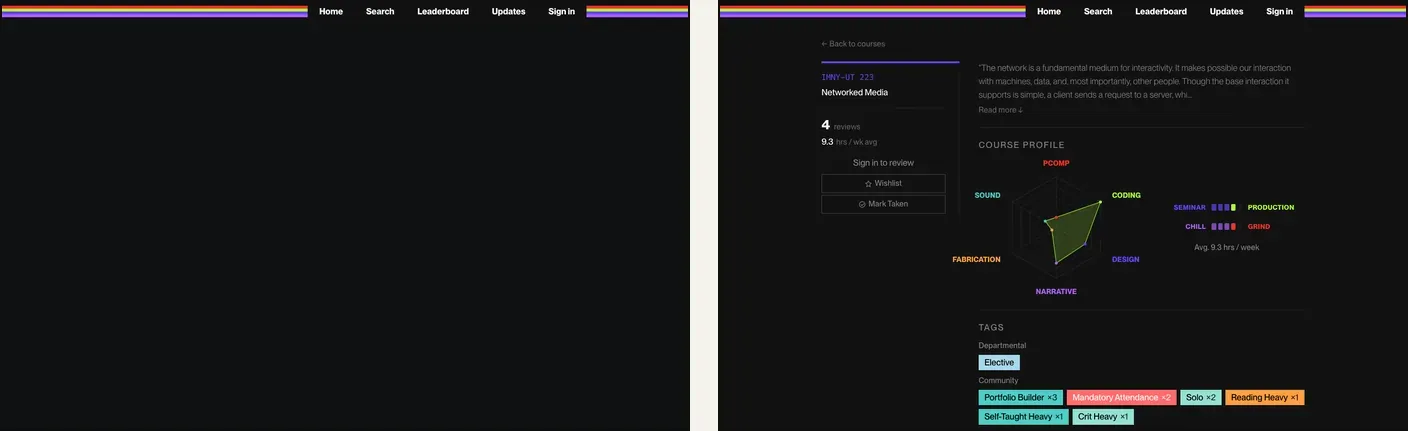
I audited it against Nielsen’s ten heuristics. Four problems mattered most:
- Aesthetic and minimalist design (#8). The landing page used its first screen on slogans. The data a student came for started below the fold.
- Consistency and standards (#4). The same tag looked different on the course page, in search and on profiles.
- Recognition rather than recall (#6). Nothing remembered what you wishlisted or took, so you had to remember it yourself.
- Visibility of system status (#1). Nothing told you whether the course data was current.
The data showed a fifth problem. ITP has 74 of the 118 courses in the catalogue but only 2 of the 27 reviews, so every panel built from reviews showed IMA classes. The site looked like it was for IMA only.
Who it’s for
Two groups use Pixelatd: ITP graduate students and IMA undergraduates, mostly in the weeks around registration. They come back several times in a season, first to browse, then to compare a shortlist, then to check a section time. After the term, the best of them come back once more to write a review.
That gave the redesign three jobs:
- Find a course and see what it demands before reading a word of its description.
- Come back to your own shortlist without searching again.
- Give back with a review that takes two minutes.
This round is based on the site’s own data and a heuristic audit, not interviews. A usability test with students from both programs is the next step.
Structure
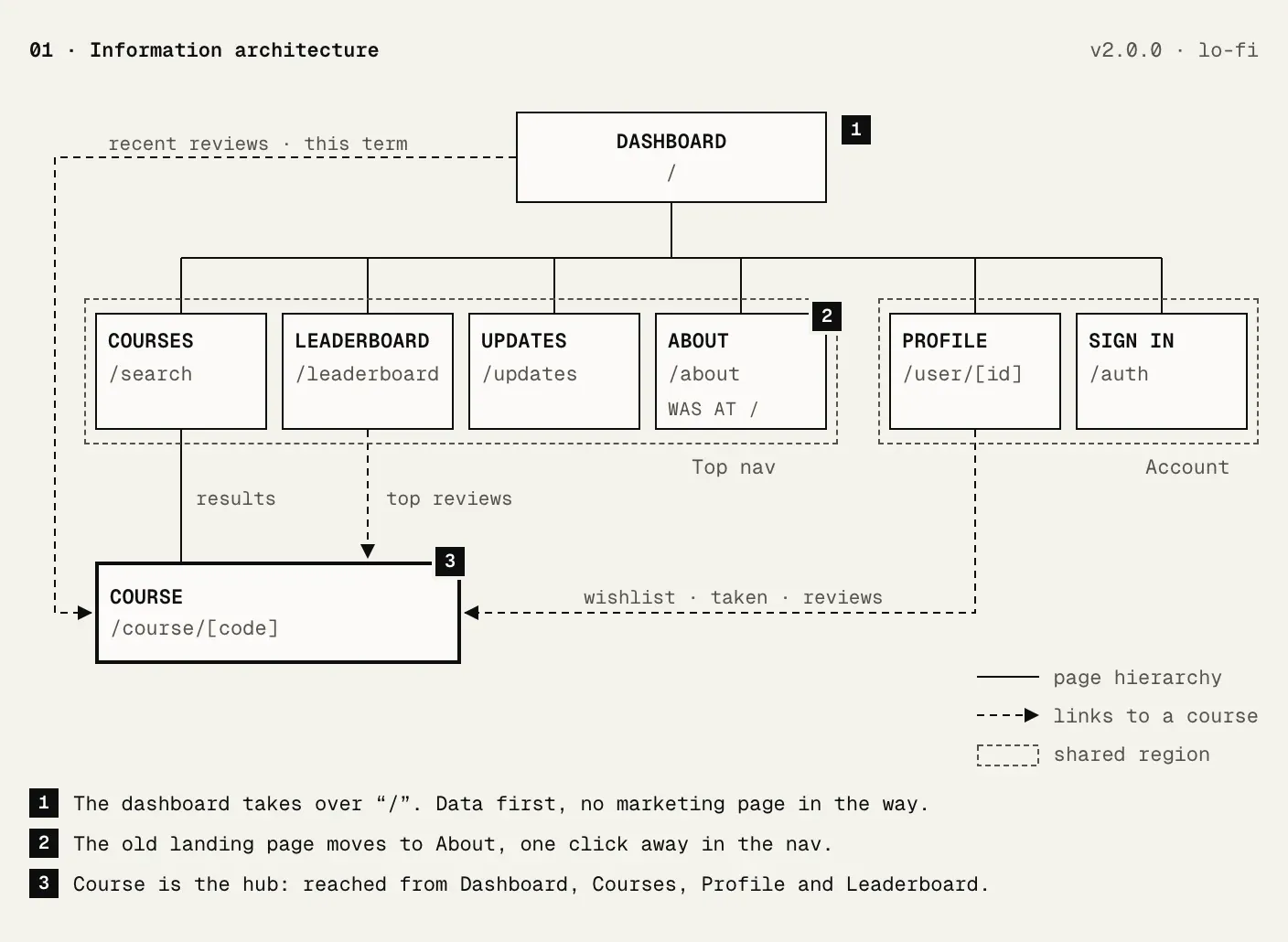
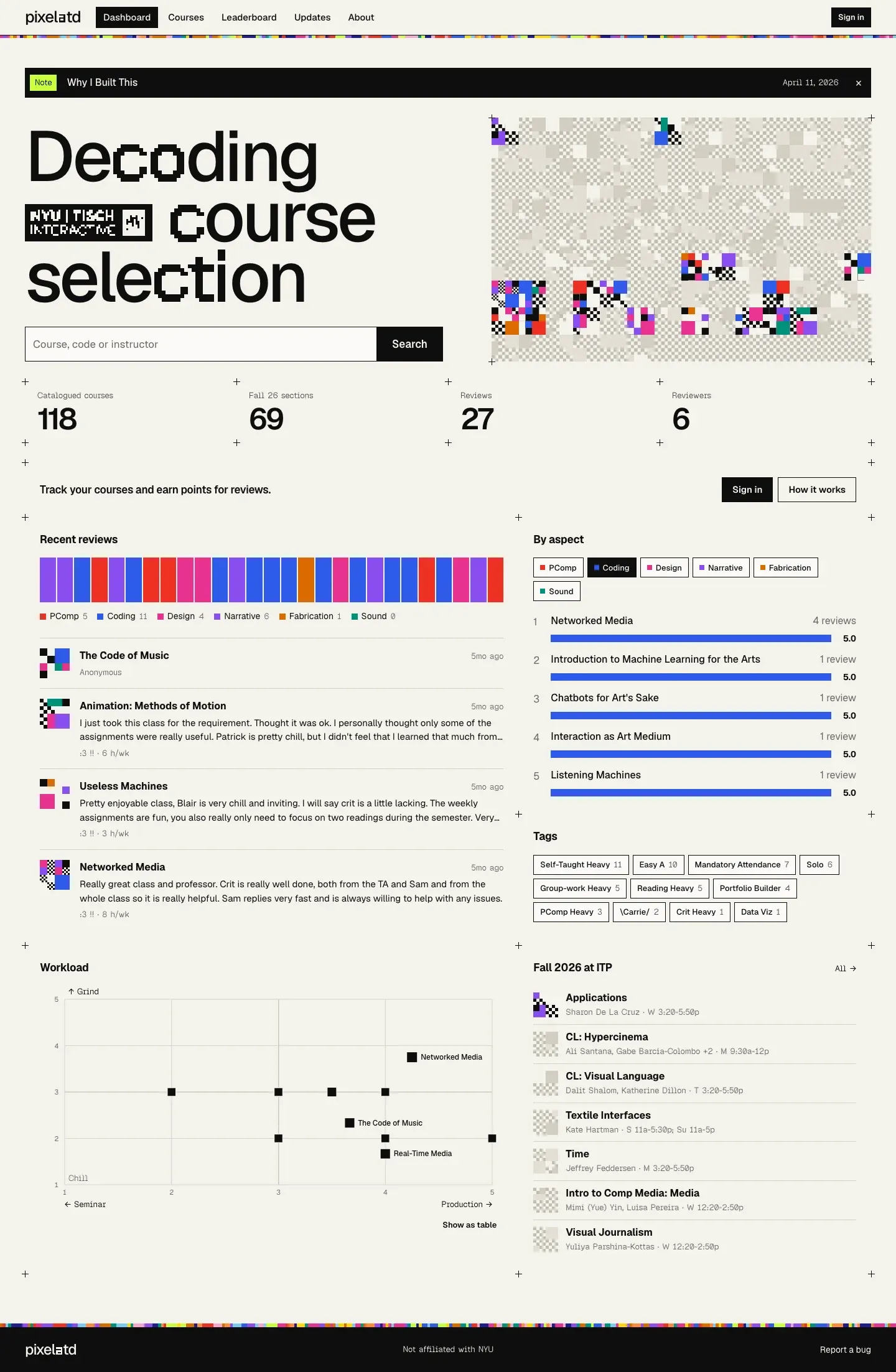
A dashboard is “monitored at a glance,” in Stephen Few’s definition. That is what a returning student needs, so the dashboard took over the home page and the landing content moved to About. The course page became the hub that every other page links into.
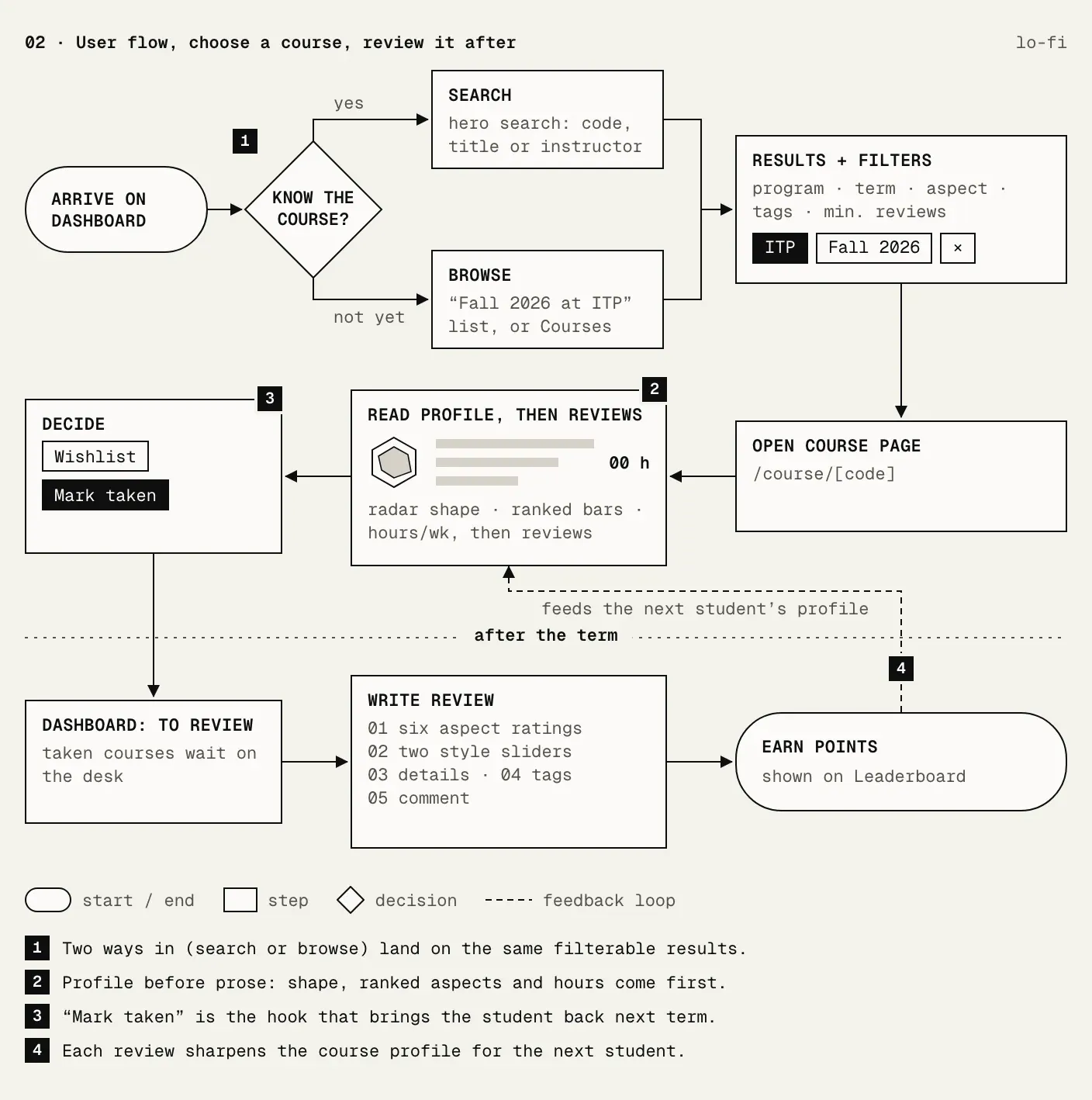
The flow follows the three jobs: search or browse, read a course’s profile, save it, and come back after the term to review it.
Wireframes
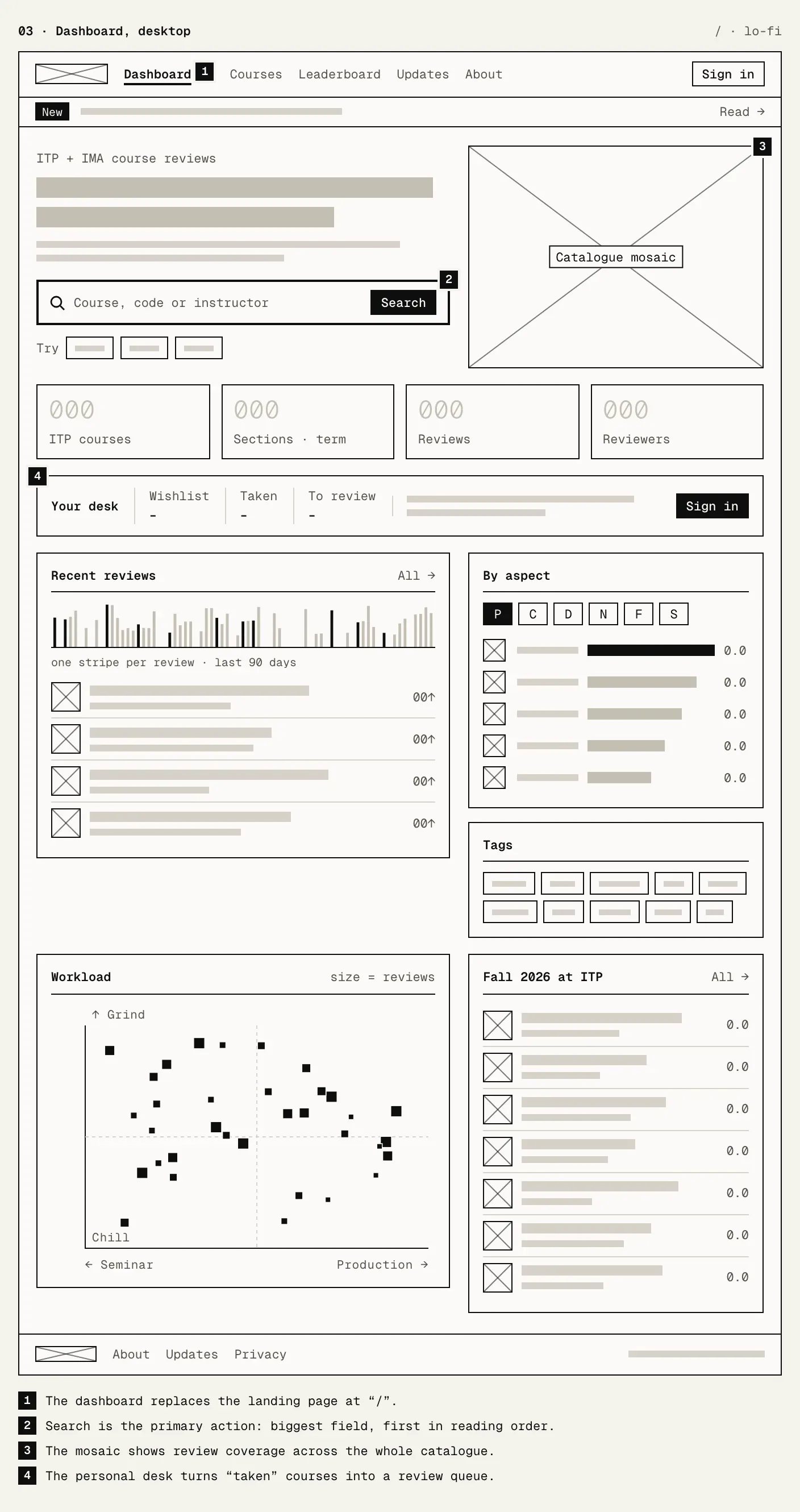
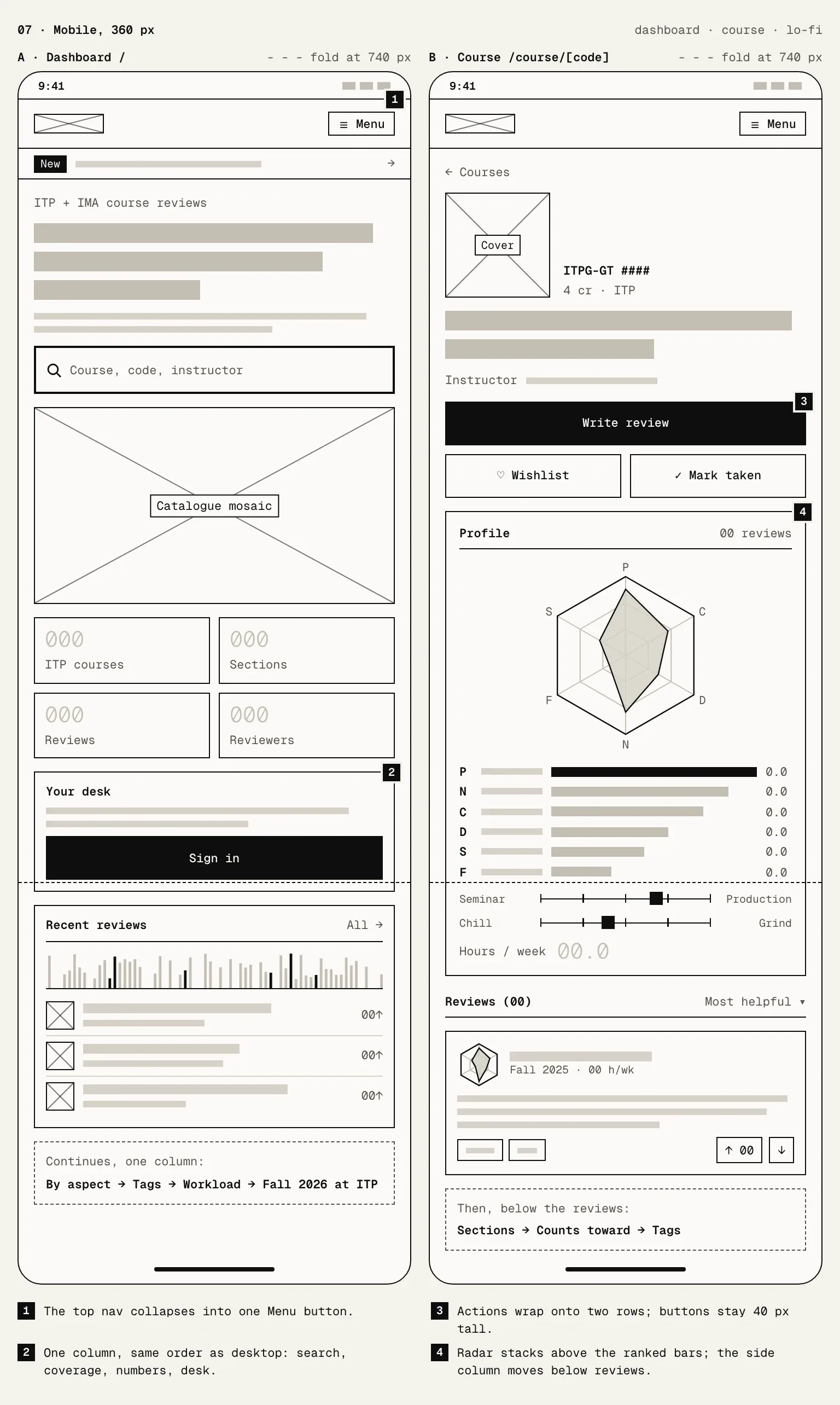
I redrew each screen as a grey-box wireframe to check the structure without the styling, which is what low-fidelity work is good for. The dashboard puts search first, then the catalogue, the numbers, a personal desk, and the panels built from reviews.
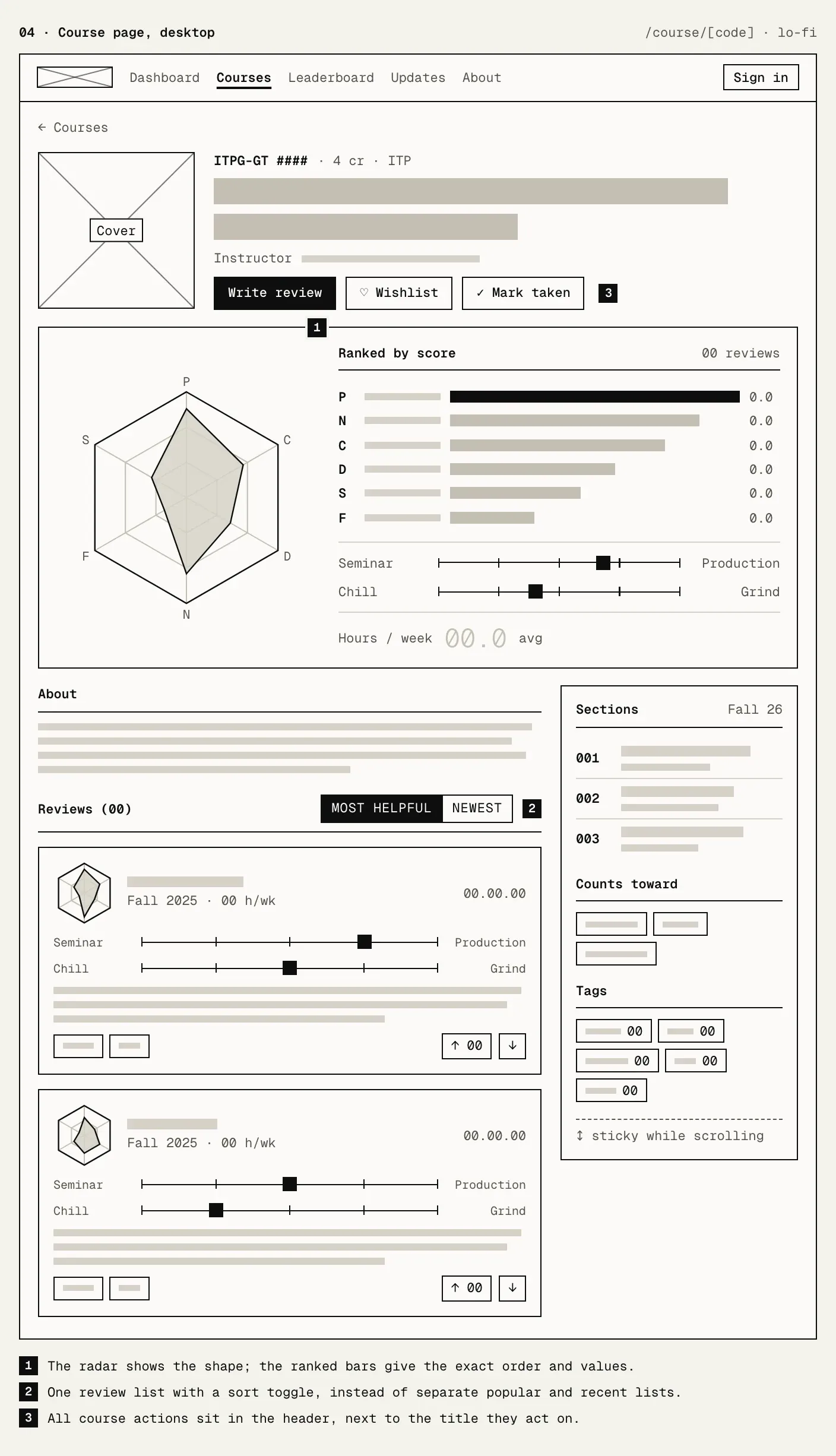
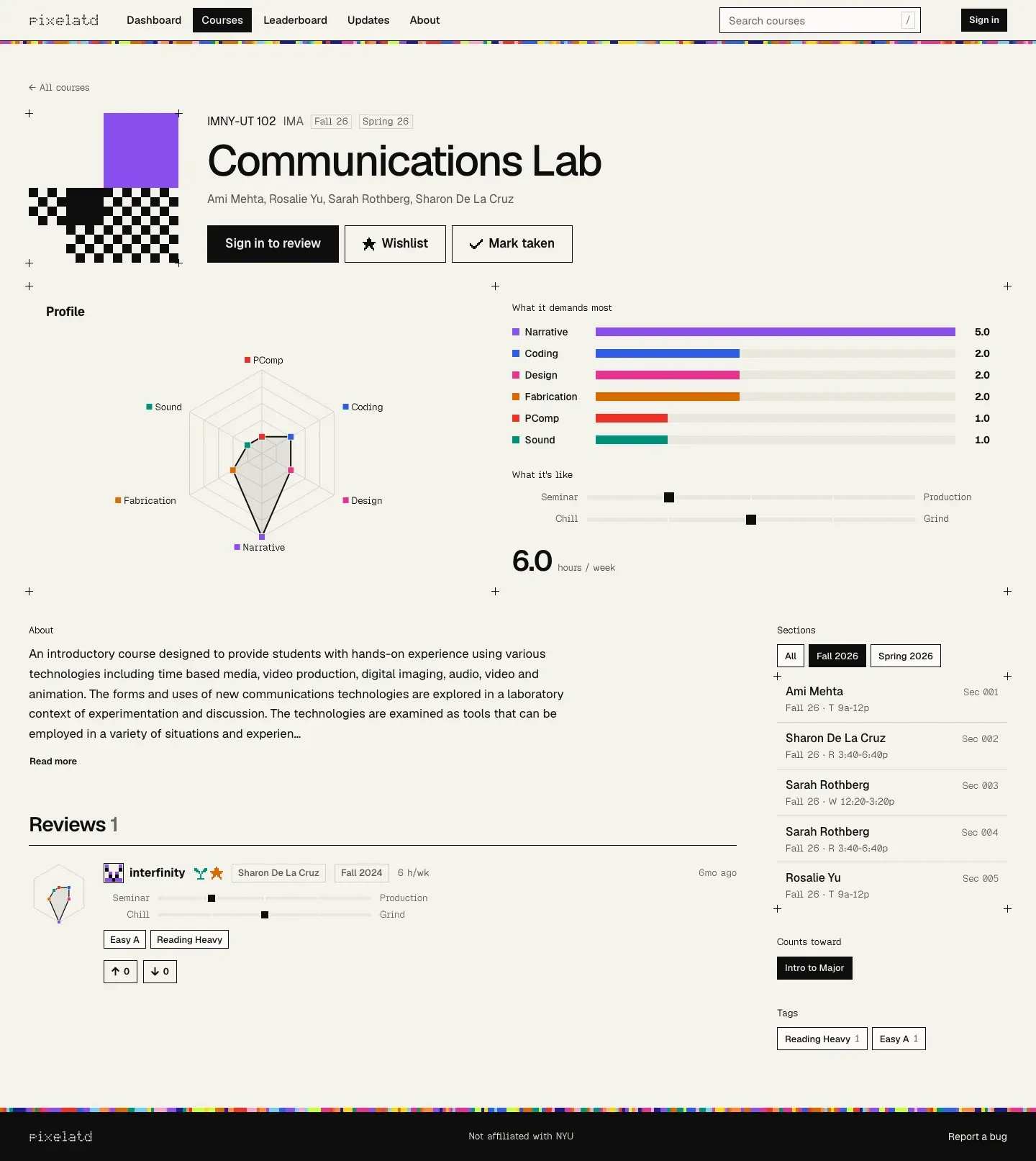
The course page leads with the profile, so the answer to “what does this class ask of me” comes before the description.
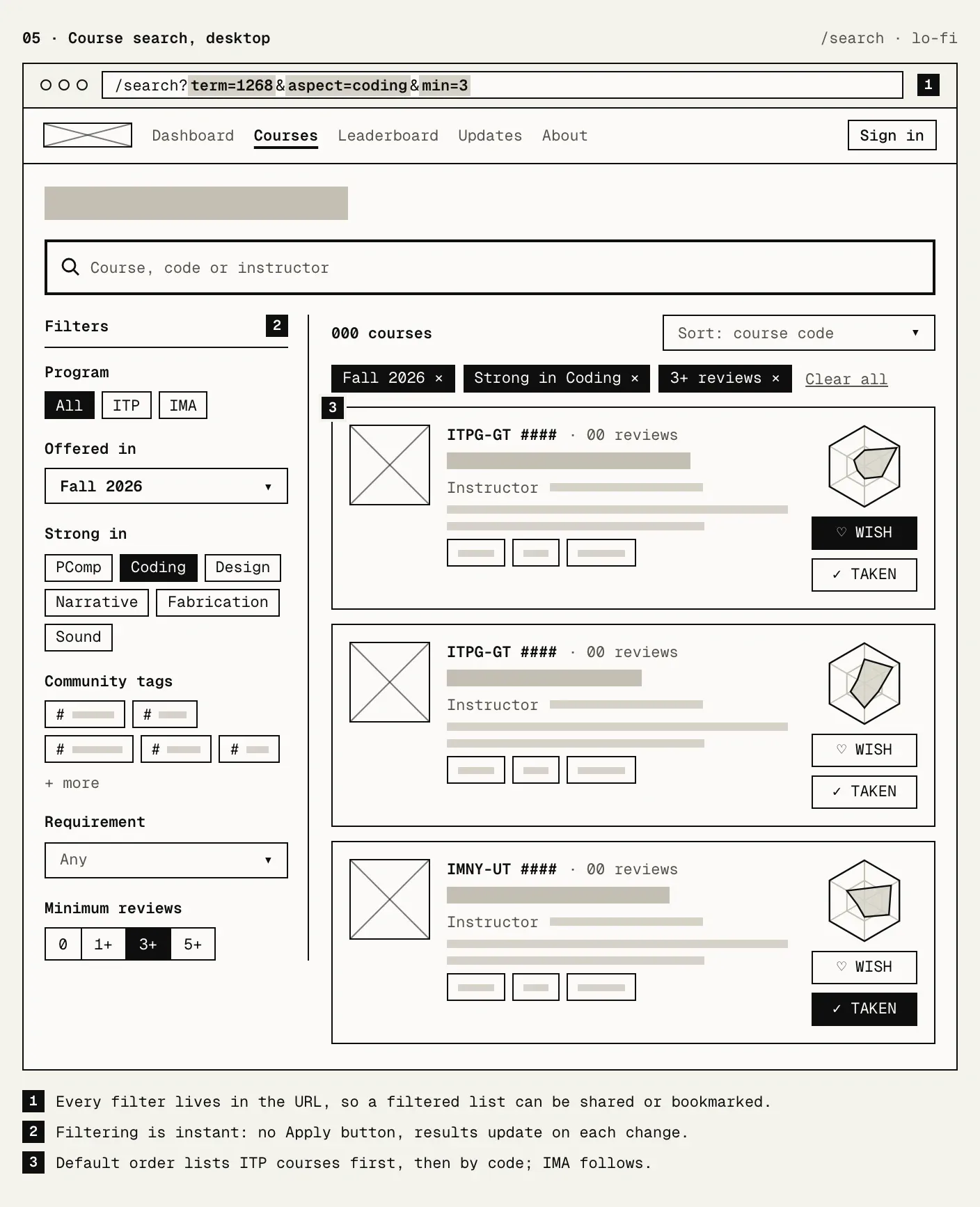
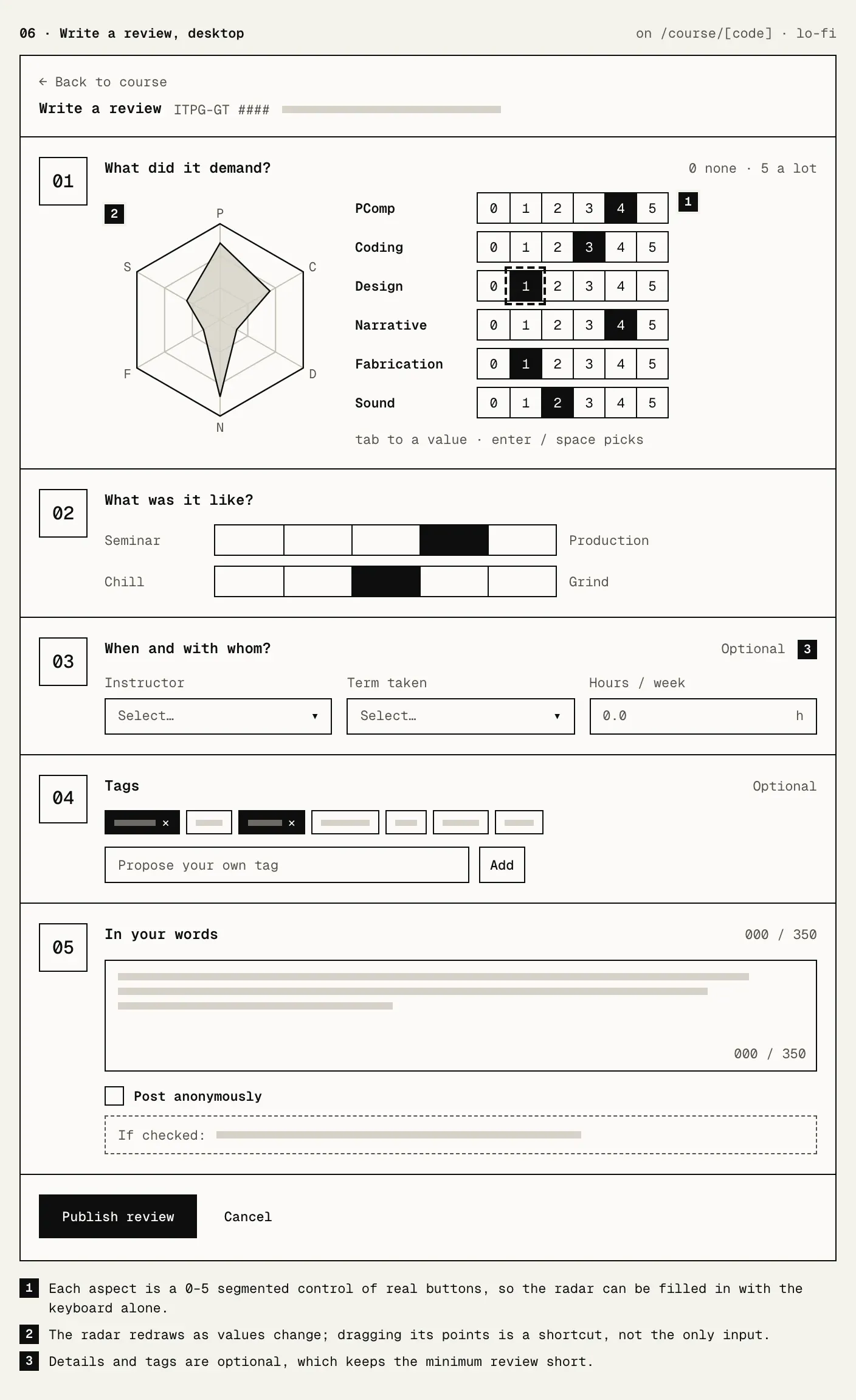
On a phone the side columns move under the main one, and the radar stacks above its bars.
Visual direction
I started from a moodboard of five posters. Each gave the system one idea:
- A type exhibition built from vertical colour barcodes became a barcode with one stripe per review.
- A pixel mosaic became the course covers.
- Overlapping RGB flowers suited the six-axis radar the site already had.
- Stripes that get denser down the page became a rule: a finer pattern means more intensity.
- A generative checker mosaic became the cover algorithm itself.
All five sit on a strict grid, in the tradition of Müller-Brockmann’s grid systems and the International Typographic Style. Three of them are light, so the site moved from black to paper and ink.
Colour
Six aspect colours carry identity everywhere: red for physical computing, blue for coding, pink for design, purple for narrative, orange for fabrication and teal for sound. I checked them for colour-blind readers by simulating deuteranopia, protanopia and tritanopia with the Machado, Oliveira and Fernandes model. Every neighbouring pair stays apart, and each colour clears 3:1 against paper for non-text contrast.
Colour is only ever a fill. Text stays in ink, so labels meet WCAG text contrast no matter what sits next to them. Lime is the one highlight.
Corner marks instead of outlines
The first pass drew a 1px ink line around every panel. It held the grid together, but on a dense dashboard it was a lot of ink that carried no data, which is what Tufte’s data-ink ratio warns against. Removing the lines entirely went too far. The panels floated, and grouping depended on spacing alone.
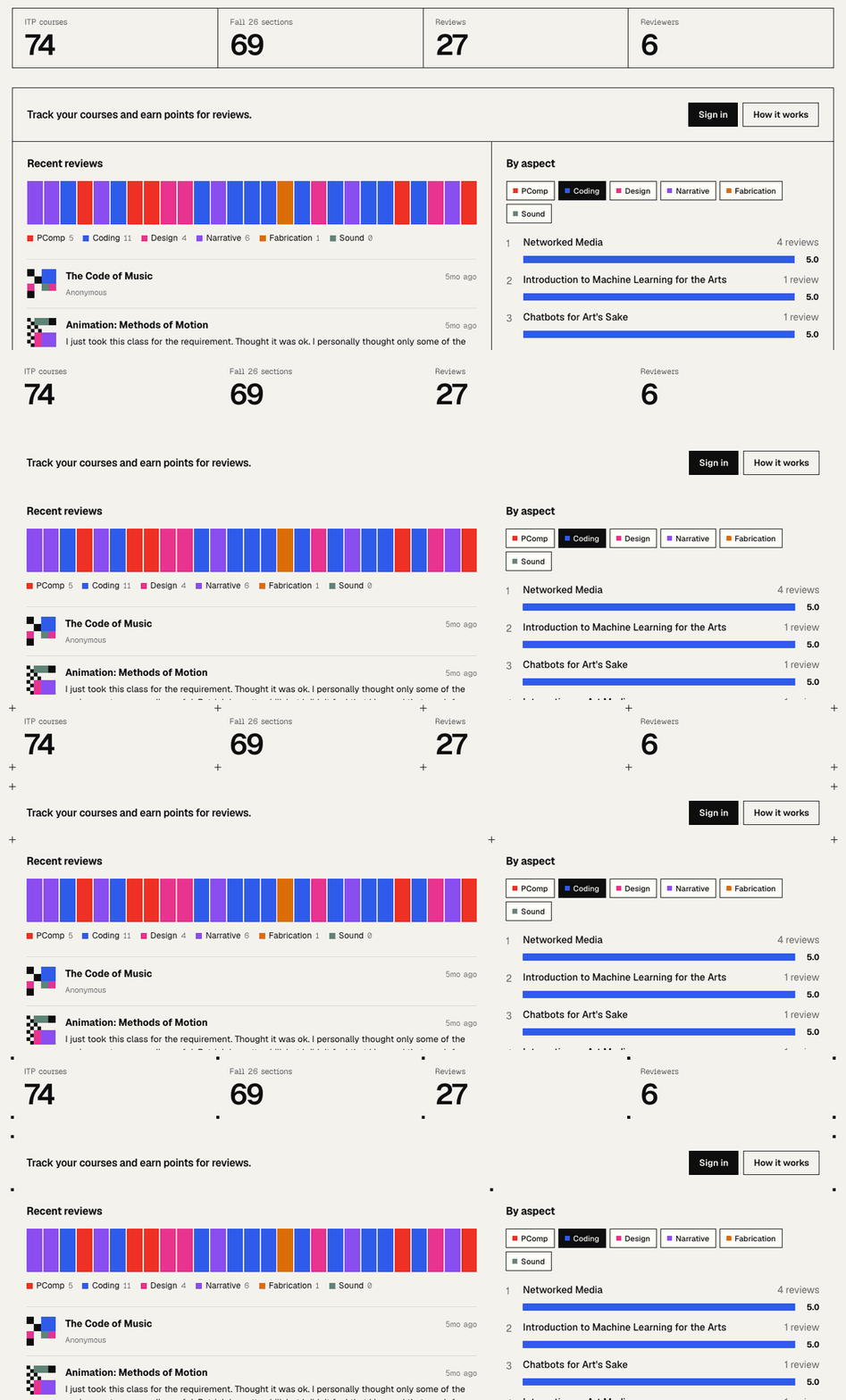
The answer came from print. Crop and registration marks mark a sheet’s corners without drawing its edges. A small cross on each panel corner is enough for the eye to close the shape. Neighbouring panels share corners, so their crosses land on the same pixel, and the grid reads as a set of intersections.
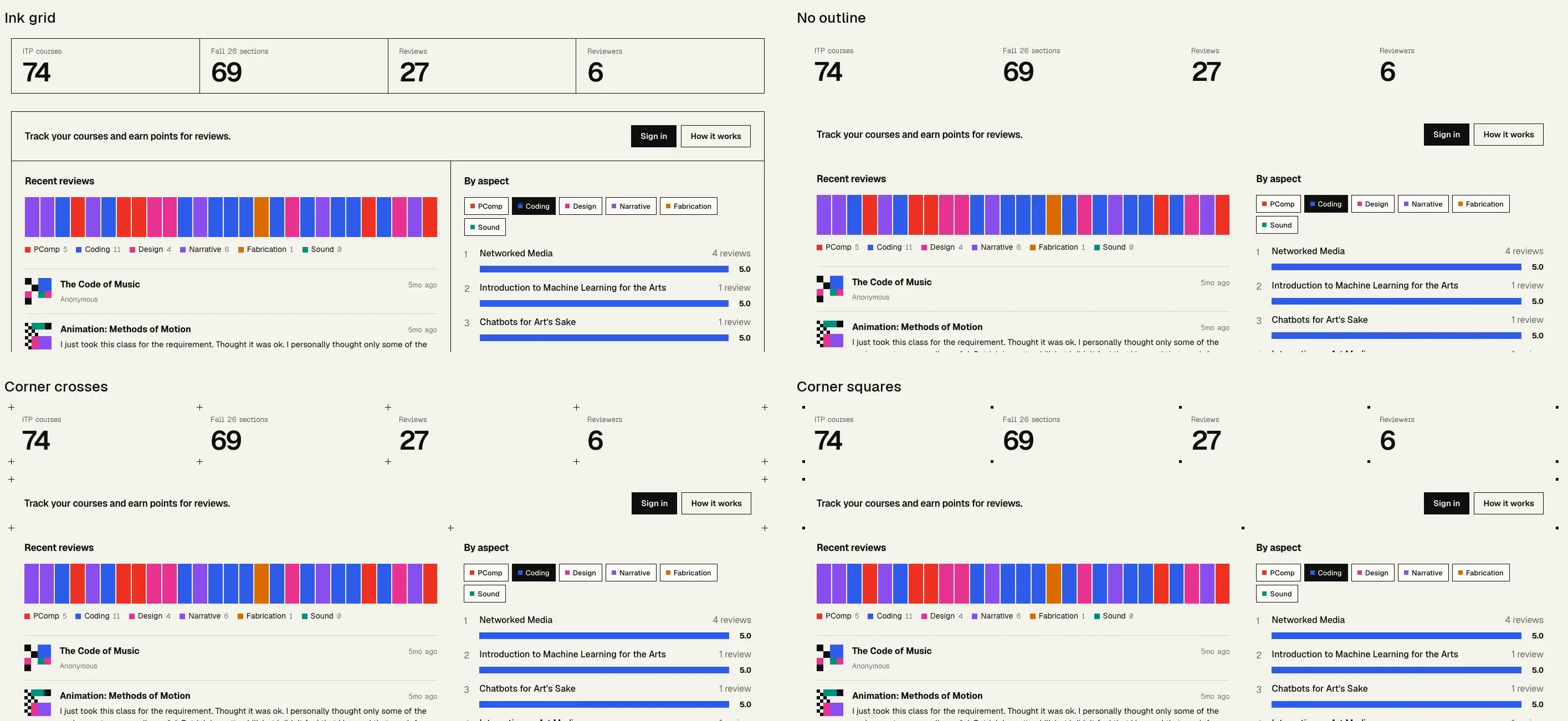
- Ink grid. Clear, but heavy, and every line competes with the data.
- No outline. Calm, but the panels float.
- Corner crosses, chosen. The grid stays, with a fraction of the ink.
- Corner squares. Closer to the pixel art, but at this size they read as dust.
Fields and buttons keep their full outline because they are things you act on, not containers. Nothing has a drop shadow, tooltips and focused fields included.
Type
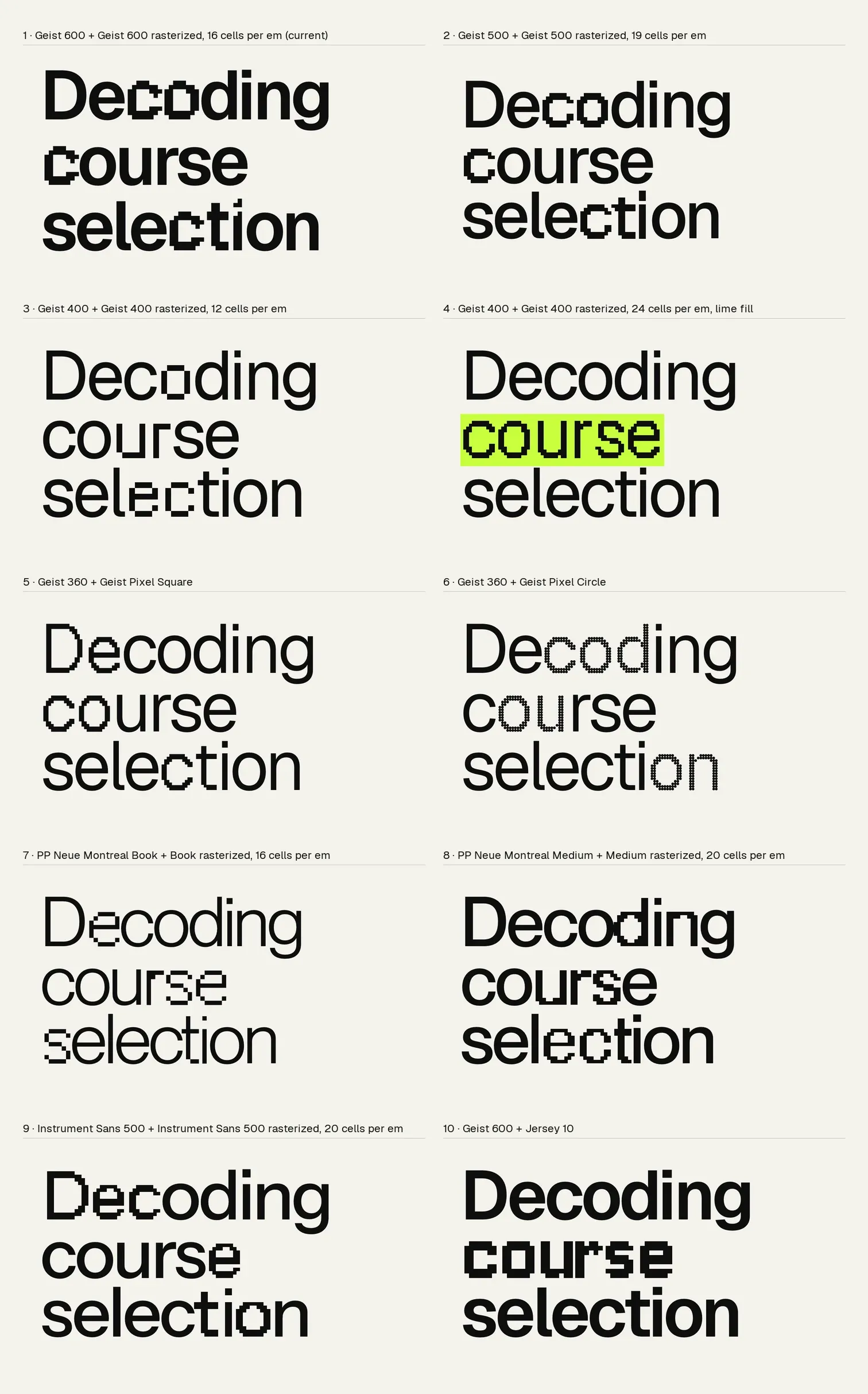
The pairing is soft meets hard: a plain grotesk for reading, and pixels for the brand. The pixel letters took four rounds, shown here in order.
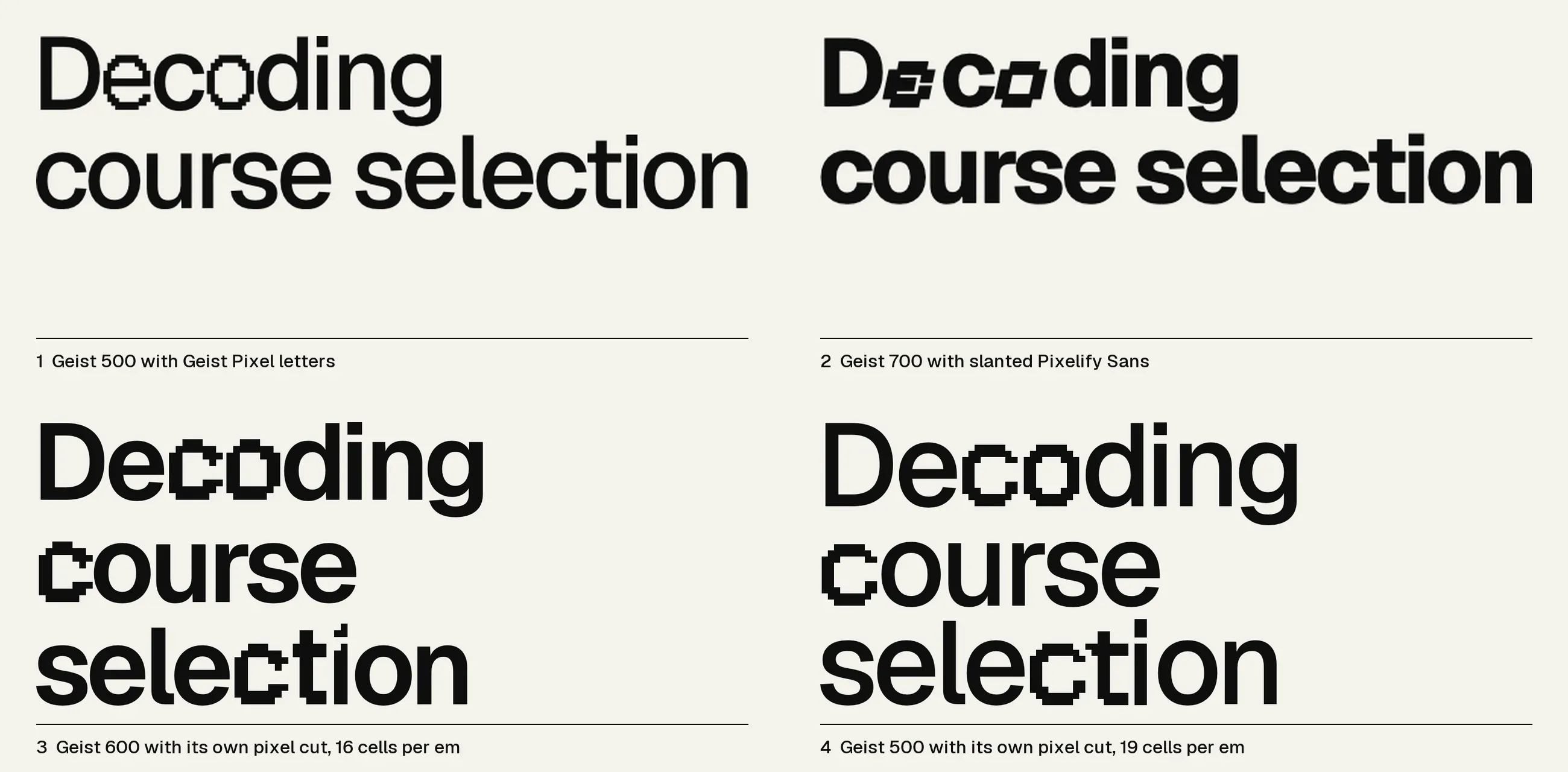
- Geist with letters from Geist Pixel. Same family, but the pixel letters were lighter and narrower than the sans, so the words looked patched.
- Heavier Geist with slanted Pixelify Sans. Pixelify has no italic, so the slant was a synthesised oblique, and its letters are a different design. It read as another font dropped into the word.
- Geist with its own letters rasterized. The reference here was a Swiss poster where a few letters of a grotesk are swapped for a bitmap cut of the same grotesk, so each word still reads as one word. Sampling Geist itself onto a grid gives the pixel letters the same width, baseline and weight as the smooth ones. At weight 600 and 16 cells per em, though, half-covered rows left nubs on the x-height.
- Ten pairings side by side. I compared weights, grid sizes and families, including two real pixel fonts and a commercial grotesk. The pick was Geist 500 cut at 19 cells per em. There a stem is exactly two cells wide, and each letter is nudged by a fraction of a cell so its stems land on the grid.
Pixel letters appear only in brand headlines and the wordmark, never in course names or anything a student wrote. The wordmark is “pixelatd” in the same Geist 500 with one pixel “a”, cut on a coarser 10-cell grid so the pixels still show at nav size. Small text, like course codes, labels and dates, is set in Geist Pixel at 13.158px. Geist Pixel draws on a grid of 0.038em, so at that size one grid cell is exactly one device pixel on a 2x screen, and the letters stay crisp instead of blurring between pixels. Nothing is set in all caps.
Covers that encode the reviews
Every course gets a generated cover, an idea that goes back to identicons, which turn a hash into a picture you can recognise. Here the course code fixes where things go, so a cover never changes on its own, and the reviews decide how much of everything there is:
- Hue is what the course demands. A coding-heavy course is mostly blue.
- Resolution is how many reviews it has. One review gives big blocks; more reviews give finer detail.
- Checker grain is workload. A chill course has a coarse checker, a grind a fine one.
- Solid versus open is seminar versus production. Discussion courses leave more paper, making courses fill more blocks.
- Grey means nobody has reviewed it yet.
In the first pass only the colours meant anything and the patterns were random. Asking what the patterns were for turned them into data too. The amounts are set by quota rather than chance, so the proportions hold even on a 4×4 thumbnail. The About page carries the key.

Every review is also a stripe in the dashboard’s barcode, coloured by the aspect it rated highest, so the catalogue’s character shows before any numbers do.
A profile you can read
The radar is the brand image of a course, but Stephen Few points out that values are hard to compare around a circle. So the course page pairs it with the same six values as ranked bars on one straight axis. The radar gives the shape, the bars give the order.
Rating used to mean clicking small dots on the radar. Each aspect now has a row of 0 to 5 buttons, each a real button that works from the keyboard and clears the 24px target size.
Motion
The first pass animated with steps() timing, so reveals and hovers moved in a few hard frames, like a screen refresh. On a real screen that read as lag. The pixels now live in space, in grids, checkers and crisp edges, and never in time. Every transition uses one ease-out curve, panels rise and fade in, loading skeletons are a checker drifting one tile per cycle, and the dither field changes a few cells every frame instead of all of them eight times a second. With reduced motion turned on, all of it stops.
Cutting what the screen already says
The first pass explained everything. The dashboard had a subtitle repeating the headline, a “Live · Fall 2026” line, a caption on the mosaic, panels numbered 01 to 07 in no real order, three lists of the same recent reviews and two search boxes. The course page showed its review count three times.
Krug’s third law says to get rid of half the words on each page, then half of what’s left, and NN/g’s heuristic #8 gives the reason: every extra unit of information competes with the relevant ones. I set one rule: if a caption, label, count or number tells the user nothing the screen doesn’t already show, delete it.
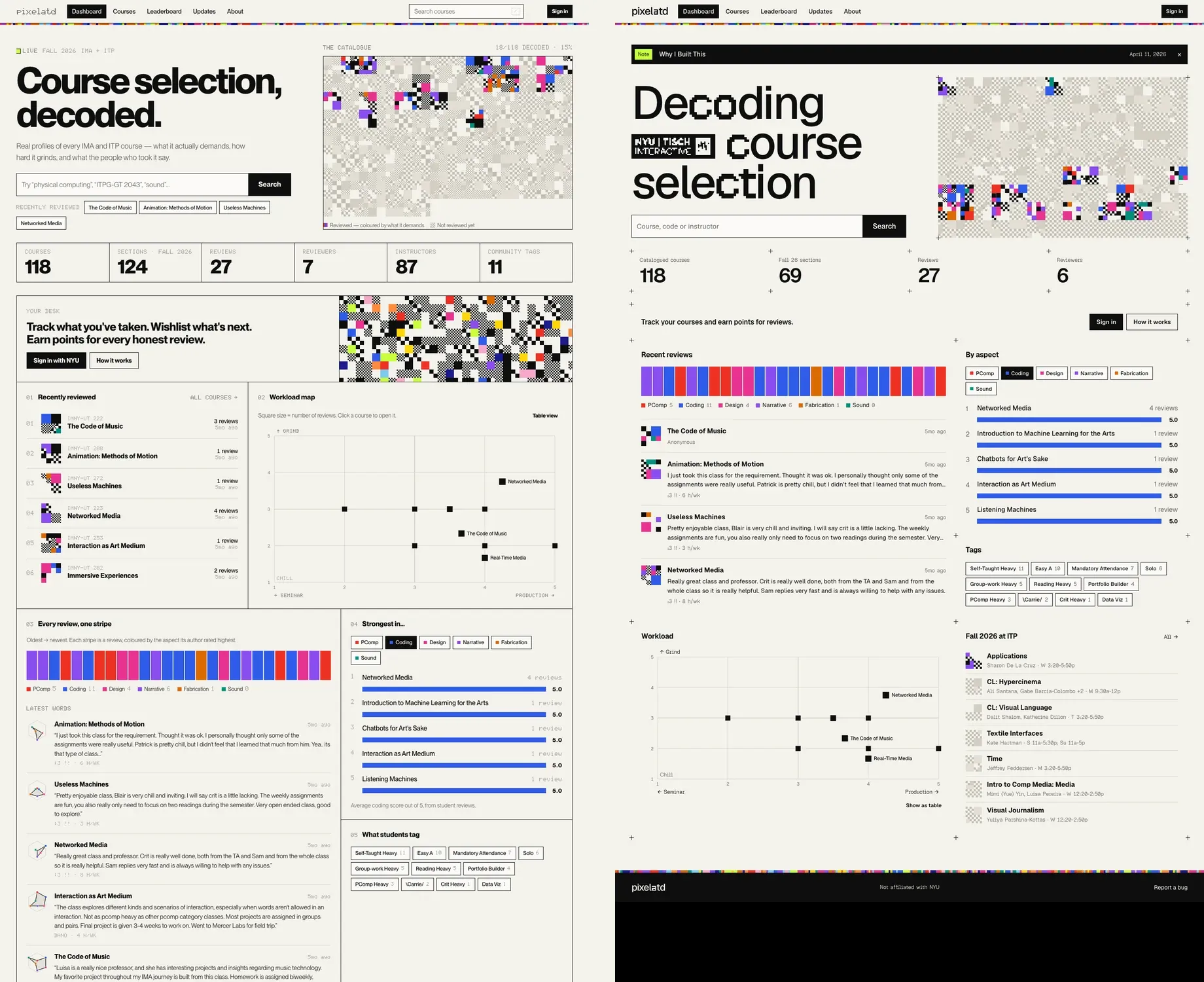
- Three review lists became one panel, and the dashboard lost its second search box and second mosaic.
- Numbers stayed only where order matters: the steps of the review form and the leaderboard.
- 45 different small text sizes became one.
- No all caps, no em dashes. Labels are sentence case, so they read as words, not signage.
Status without a blog post
The only news on the old home page was the latest dev note, which went stale as soon as I stopped writing. Now the banner shows whichever is newer: a note, or the last time the weekly catalog sync changed something, with what changed, for example “Course data updated for Fall 26: 14 new sections”. The site reports its own state without anyone writing about it.
Built for ITP too
ITP now comes first in sorting and filters, the dashboard counts this term’s ITP sections, and a panel lists this term’s ITP classes whether or not anyone has reviewed them yet.
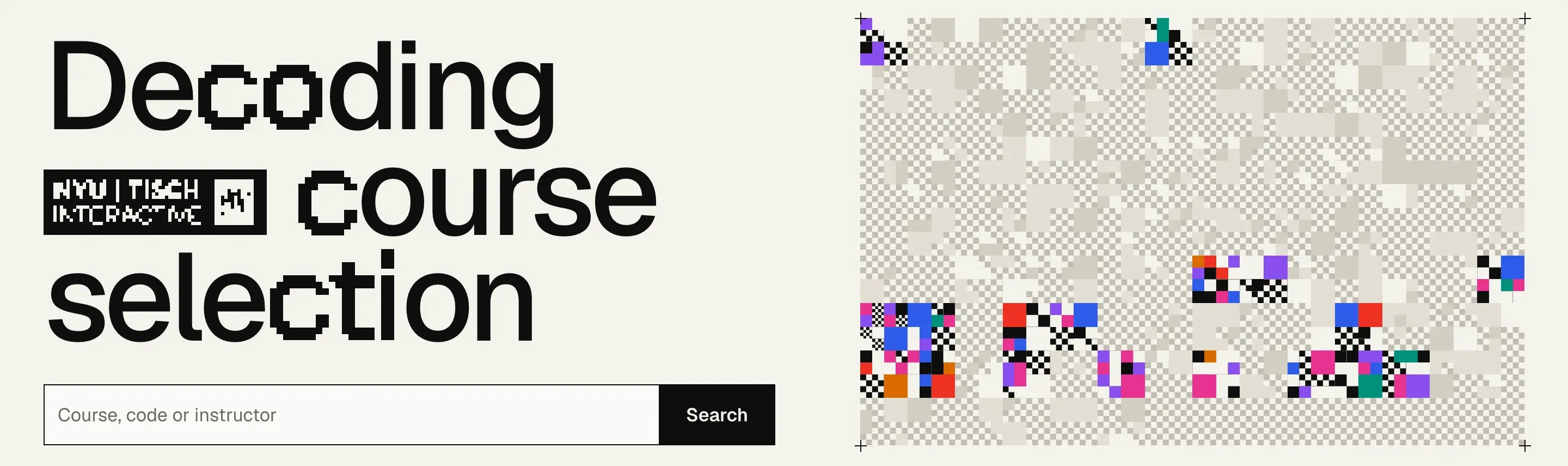
The site also needed a hint of who it is for, without a tagline. The first try was the NYU Tisch Interactive lockup at the foot of the dashboard, drawn pixelated, which decoded into aspect colours under the pointer. It was a full-width poster sign-off for what should be a whisper, and almost nobody scrolls that far.

The final version is a sticker set inline in the slogan, in front of “course”, at x-height like a word. It is the official logo sampled down to a third of its size, cut to one bit of ink and paper, and scaled back up with hard edges, so it reads as a compressed scrap in the same pixel language as the headline. It never resolves to the clean logo. Hovering flips it to ink on lime, the way the primary buttons answer.

Trust
The audit turned up two privacy problems. Profiles showed a user’s anonymous reviews and their email to everyone. Both are owner-only now, and the database enforces it, not just the interface. A review site only works if people believe anonymous means anonymous.
Outcome
The redesign is live at pixelatd.io, served from Cloudflare Workers instead of a hand-managed server. The old address gets a short moved page that forwards to the same path on the new domain.
What’s next:
- A usability test with ITP and IMA students on the three jobs, timed.
- Arrow-key support in the rating controls, which are marked up as radio groups but only take Tab and Enter today.
- An outreach push for ITP reviews. That is not a design problem.
References
- Jakob Nielsen, 10 usability heuristics for user interface design, Nielsen Norman Group.
- Therese Fessenden, Aesthetic and minimalist design (heuristic #8), Nielsen Norman Group, 2021.
- Steve Krug, Don’t Make Me Think, Revisited, New Riders, 2014.
- Stephen Few, Dashboard confusion, Intelligent Enterprise, 2004.
- Stephen Few, Keep radar graphs below the radar, far below, DM Review, 2005.
- Edward Tufte, The Visual Display of Quantitative Information, Graphics Press, 1983.
- Alita Kendrick, Principle of closure in visual design, Nielsen Norman Group, 2021.
- Anthony Allen, Crop marks and registration marks, Boxcar Press, 2015.
- Josef Müller-Brockmann, Grid Systems in Graphic Design, Niggli, 1981.
- Kara Pernice, UX prototypes: low fidelity vs. high fidelity, Nielsen Norman Group, 2016.
- Machado, Oliveira and Fernandes, A physiologically-based model for simulation of color vision deficiency, IEEE TVCG, 2009.
- W3C, WCAG 2.2: 1.4.3 Contrast, 1.4.11 Non-text contrast, 2.5.8 Target size.
- Identicon, Wikipedia.
- Vercel, Geist and Introducing Geist Pixel, 2026.
- MDN, font-style, on synthesised italics.